PIC-MCP
This item is OBSOLETE
FEATURES
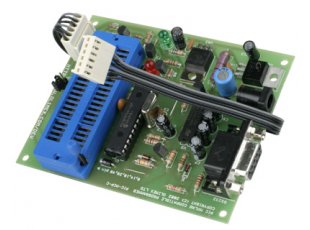
- PIC-MCP is a low-cost alternative to Picstart+. It is MPLAB compatible and MPLAB recognizes PIC-MCP as Picstart+. To operate, it needs an external power supply of 18VDC. PIC-MCP has a gold plated 40 pin ZIF socket which accepts all types of DIP PIC microcontrollers. In addition it have ICSP connector and can be used to program all PIC-PxxB prototype boards.
- Supported devices: ALL devices which PICSTART+ supports (excluding PIC17XXX series)
- ICSP 30 cm (12") cable
- Dimensions 100x80 mm (3.9x3.15")
DOCUMENTS
- PIC-MCP.pdf
- PIC-MCP tutorial in Spanish made by our Chile distributor
- PIC ICSP connector
SOFTWARE
- Firmware upgrade UPGRADE-130 upgrades firmware for MPLAB 8.10
FAQ
- How to use PIC-MCP
-
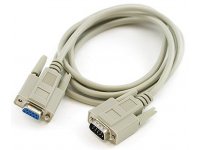
You have to connect PIC-MCP with RS232 cable to your PC and apply power supply, then you have to point MPLAB to search for PICSTART+ on this COM port. On the PIC-MCP board there is arrow mark where to put the PIC pin.#1 so all PICs are put the same was PIN.#1 to arrow mark. Only the very old PIC16C5X microcontrollers have different way to stuff and there is special mark on the ZIF socket where to put their PIN.#1 down right.
The white cable is for ICSP programming you connect it to your target board and program your PIC on your target. The ZIF socket is for programming DIP PIC parts. When you use ICSP you have to close the JUMPER on the board , when you program in ZIF socket you should left open this Jumper.
- How to upgrade?
-
The upgrade procedure is very simple. You load from our website the latest UPGRADE program, connect your PIC-MCP with a RS232 cable and a apply power supply then run the upgrade program.
All PIC-MCP sold after January 2004 are with PIC18F252 microcontroller on them and following procedure should be done: connect RS232 cable, apply power supply then run PIC-MCP-upgrade.exe and setup for the COM port where connected, after the message for successful upgrade un-plug the power supply and power again to re-start the new firmware.
PIC-MCP build before January 2004 and with PIC16F876A firmware have different way to upgrade: you have to put PIC18F252 in ZIF socket, remove ICSP jumper, connect RS232 cable,apply power supply then run PIC-MCP-upgrade.exe and setup for the COM port, after the message for successful upgrade un-plug the power supply and pull PIC16F876A from DIL socket and replace with the new programmed PIC18F252. All future upgrades will be made with the build-in bootloader inside PIC18F252 so you just have to run the newest PIC-MCP-upgrade.exe
VERY IMPORTANT: DO NOT PUT OTHER THAN PIC18F252 MICROCONTROLLER WHEN YOU RUN THE UPGRADE SOFTWARE