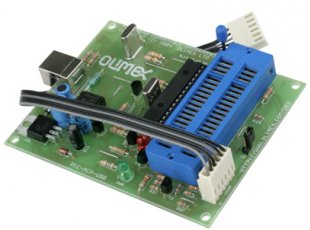
PIC-MCP-USB
This item is OBSOLETE
FEATURES
- PIC-MCP-USB is a low-cost alternative of Picstart+. It's MPLAB compatible and MPLAB recognizes PIC-MCP-USB as Picstart+. This is the perfect solution for the new computers without a RS232 port as it generates RS232 signals and power supply from the USB port. PIC-MCP-USB has a gold plated 40 pin ZIF socket which accepts all types of DIP PIC microcontrollers - making it very comfortable for bare chip programming. In addition, it has an ICSP connector and can be used to program all PIC-PxxB prototype boards.
- Supported devices and IDEs: ALL devices supported by PICSTART+ (excluding PIC17XXX series). Please note that PIC-MCP-USB is not supported under the MPLAB X. It works fine with MPLAB versions prior to MPLAB X (e.g. MPLAB 8.XX).
- ICSP 30cm (12") cable
- Dimensions - 100x80mm (3.9x3.15")
DOCUMENTS
- PIC-MCP.pdf
- PIC-MCP tutorial in Spanish made by our Chile distributor
- PIC ICSP connector
SOFTWARE
- Firmware upgrade UPGRADE-130 upgrades firmware for MPLAB 8.10
- FT232 drivers for your OS download and install to be able to work with PIC-MCP-USB via the virtual COM port and MPLAB 8. Note that the latest FTDI VCP drivers might not work properly with your device. Follow the FAQ section.
FAQ
- I have downloaded MPLAB X and I can't seem to be able to configure my new PIC-MCP-USB with the mentioned IDE?
- Unfortunately, PIC-MCP-USB (and, in that regard, PICSTART+) doesn't work with MPLAB X. Initially there was an intent for such support but it was decided that it would require too much effort and such support was dropped. The PIC-MCP-USB is suitable only for the MPLAB versions prior to MPLAB X.
- When I try to enable the PIC-MCP-USB I get a message that I need to upgrade the firmware to version 4.xx.xx. What should I do?
-
This behaviour is caused by the new FTDI VCP drivers. You should uninstall the latest FTDI drivers you have (which is sometimes quite hard to do, due to automatic Windows Driver Update). I recommend you to use this program: FTClean. When you start the FTClean.exe leave FTDI as VID(hix) and write "6001" in the PID field. Then click "Clean System" button, disconnect the PIC-MCP-USB from the computer and agree with the uninstallation. Wait for a few seconds until the cleaning process is complete.
After the drivers are uninstalled and BEFORE you plug the PIC-MCP-USB to the computer again make sure the auto-search (auto-update) for drivers is disabled. Then plug the device and manually point the installer to the folder with the drivers that are confirmed working: FTDI drivers v. 2.04.06
- I don't know how to use the PIC-MCP. Can you give me some instructions?
-
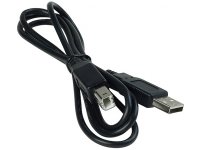
You have to connect the PIC-MCP with an USB cable ( to your PC and apply a power supply. Then you have to point the MPLAB to search for PICSTART+ on this COM port. On the PIC-MCP board there is an arrow mark where to put the first pin of the PIC microcontroller. Almost all PICs get connected the same way: PIN #1 should be at the arrow mark of the ZIF socket. The only exceptions are the very old PIC16C5X microcontrollers that have a different way to plug and there is a special mark on the ZIF socket where to put their PIN #1 down right.
The white cable is for ICSP programming - you connect it to your target board and program your PIC on your target. The ZIF socket is for programming DIP PIC parts. When you use ICSP you have to close the JUMPER on the board , when you program in ZIF socket you should left open this Jumper.
- I was wondering if I should upgrade the firmware?
-
Probably it is not necessary since the boards ship with the latest firmware.
Still the upgrade procedure is very simple. You download the latest UPGRADE program from the software section above, then connect your PIC-MCP with USB type B cable to your personal computer. Then you run the upgrade program.
All PIC-MCP-USB units, sold after January 2004, come with a PIC18F252 microcontroller and the following procedure should be followed: connect an USB cable, then run UPGRADE-130.exe and setup for the COM port where connected. After the message for a successful upgrade, un-plug the power supply and power again to re-start the new firmware.
PIC-MCP build before January 2004 and with PIC16F876A firmware have different way to upgrade: you have to put PIC18F252 in ZIF socket, remove ICSP jumper, connect USB cable, and then run UPGRADE-130.exe and setup for the COM port, after the message for successful upgrade un-plug the power supply and pull PIC16F876A from DIL socket and replace with the new programmed PIC18F252. All future upgrades will be made with the build-in bootloader inside PIC18F252 so you just have to run the newest PIC-MCP-upgrade.exe
VERY IMPORTANT: DO NOT PUT OTHER THAN PIC18F252 MICROCONTROLLER WHEN YOU RUN THE UPGRADE SOFTWARE